

Token Requests
The tokenRequests parameter tells the orchestrator what tokens are needed to execute your transaction. This enables automatic cross-chain funding - users can pay from any chain with any token.
Rhinestone Warp
1auth is powered by Rhinestone Warp - a cross-chain intent protocol that handles asset movement automatically. When you submit an intent:
- Warp's solver network finds the optimal route across chains
- Solvers compete to fulfill your intent at the best price
- Assets are bridged, swapped, and delivered atomically
- You get execution guarantees - it either completes fully or reverts
This means users don't need to think about which chain their funds are on. They just sign once, and Warp handles bridging, swapping, and gas across all chains.
User Experience
When tokenRequests is specified, users see exactly what tokens will be used in the signing dialog. This provides full transparency about the transaction before they approve it.
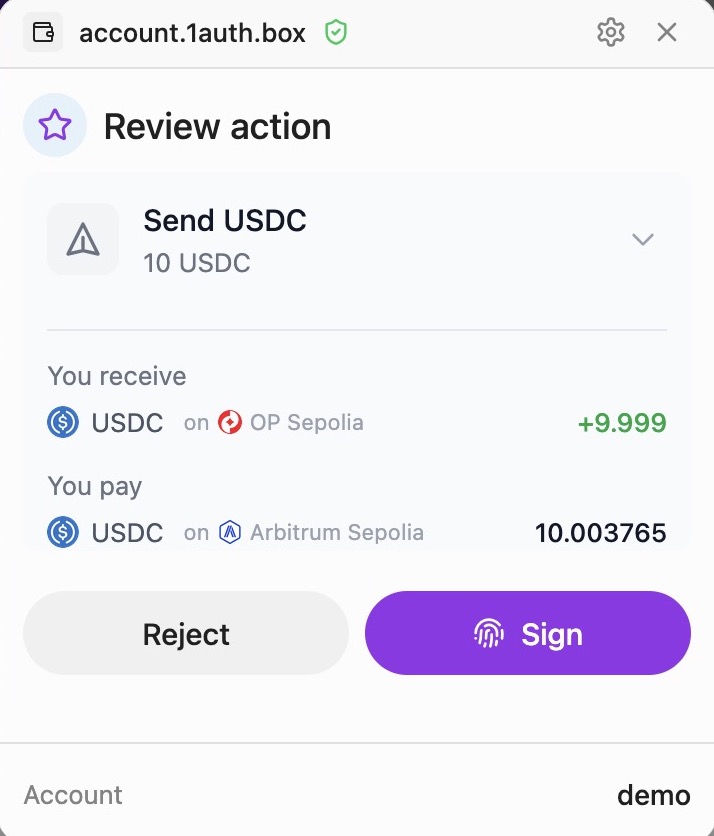
The dialog shows:
- The token being transferred (e.g., USDC)
- The amount in human-readable format
- The destination chain
- Where the funds are coming from (if cross-chain)
When to Use tokenRequests
Use tokenRequests when your transaction requires specific tokens to be delivered:
| Scenario | tokenRequests |
|---|---|
ERC20 transfer via sendIntent | Required - specify the token and amount being sent |
| Contract call needing tokens | Required - specify tokens the contract will consume |
| Native ETH transfer | Not needed - use value field instead |
Swap via sendSwap | Built automatically - sendSwap creates tokenRequests internally |
How It Works
- You specify what tokens are needed via
tokenRequests - Orchestrator checks user's balances across all chains
- Orchestrator finds the optimal route (bridges, swaps) to acquire those tokens
- User signs once - orchestrator handles everything else
- Tokens are delivered and your calls execute atomically
Interface
interface TokenRequest {
token: string; // Token contract address on target chain
amount: bigint; // Amount in base units (use parseUnits)
}Example: ERC20 Transfer
When sending USDC, tell the orchestrator you need USDC:
import { encodeFunctionData, parseUnits } from 'viem';
const USDC_BASE = '0x833589fCD6eDb6E08f4c7C32D4f71b54bdA02913';
const amount = parseUnits('100', 6); // 100 USDC
const transferData = encodeFunctionData({
abi: erc20Abi,
functionName: 'transfer',
args: [recipientAddress, amount],
});
const result = await client.sendIntent({
username: 'alice',
targetChain: 8453, // Base
calls: [{
to: USDC_BASE,
data: transferData,
label: 'Send USDC',
sublabel: '100 USDC',
}],
tokenRequests: [{
token: USDC_BASE,
amount: amount,
}],
});Even if Alice has no USDC on Base, the orchestrator will:
- Find her assets on other chains (e.g., USDC on Ethereum, ETH on Arbitrum)
- Bridge/swap to get 100 USDC on Base
- Execute the transfer
Using with EIP-1193 Provider
The tokenRequests parameter also works with eth_sendTransaction and wallet_sendCalls:
import { createOneAuthProvider } from '@rhinestone/1auth';
const provider = createOneAuthProvider({ client, chainId: 84532 });
// Single transaction with tokenRequests
await provider.request({
method: 'eth_sendTransaction',
params: [{
to: USDC_ADDRESS,
data: transferData,
tokenRequests: [{ token: USDC_ADDRESS, amount }],
}],
});
// Batch calls with tokenRequests
await provider.request({
method: 'wallet_sendCalls',
params: [{
chainId: 84532,
calls: [
{ to: USDC_ADDRESS, data: transfer1Data },
{ to: USDC_ADDRESS, data: transfer2Data },
],
tokenRequests: [{ token: USDC_ADDRESS, amount: totalAmount }],
}],
});Constraining Source Assets
Use sourceAssets to limit which tokens the orchestrator can use as input:
const result = await client.sendIntent({
username: 'alice',
targetChain: 8453,
calls: [{ to: USDC_BASE, data: transferData }],
tokenRequests: [{ token: USDC_BASE, amount }],
sourceAssets: ['USDC'], // Only use USDC from any chain
});Without sourceAssets, the orchestrator picks the cheapest route from all available balances.
Usage in Components
PayButton
<PayButton
client={client}
intent={{
targetChain: 8453,
calls: [{ to: USDC_BASE, data: transferData }],
tokenRequests: [{ token: USDC_BASE, amount }],
}}
>
Pay 100 USDC
</PayButton>See PayButton for more details.